How I Integrated Mercado Pago in Under an Hour (Using AI + MCP)
I just shipped a Mercado Pago integration for my SaaS faster than I expected: from no payment flow to real Checkout Pro payments in less than an hour.
It was not magic. It was mostly about using the right tools in the right order:
- Official SDK (instead of hand-rolled HTTP calls)
- MCP tools to read official docs fast and avoid guessing
- A webhook-first architecture (instead of trusting browser redirects)
This post is the exact approach I used, the mistakes I hit, and the setup I now trust in production.
The Stack I Used
- Backend: NestJS API
- Frontend: Next.js dashboard
- Payments: Mercado Pago Checkout Pro
- Verification: Mercado Pago webhook + signature validation
- AI workflow: MCP for doc lookup + implementation guidance
The key was simple: let AI accelerate decisions, but always anchor those decisions in official docs and SDK behavior.
The 60-Minute Implementation Path
1. Start from the backend, not the frontend
I started by creating the checkout preference server-side using the official Mercado Pago SDK.
Why:
- Access token stays private
- I can add metadata/external reference safely
- I control idempotency and retries
I included:
external_referencewith tenant + desired subdomainmetadatafor ownership checksnotification_urlfor webhook processingback_urlsfor UX redirect (not for payment confirmation logic)
2. Fix the first blocker quickly: invalid_auto_return
First error:
auto_return invalid. back_url.success must be defined
This happened because auto_return=approved requires back_urls.success.
Fix:
- In public/prod URLs, send both
auto_return=approvedandback_urls - In localhost-only environments, skip
auto_returnandback_urlsto avoid invalid config
That got Checkout Pro opening correctly.
3. Webhook-first confirmation (critical)
I kept redirect flow only for user feedback.
The real source of truth is:
- Mercado Pago calls webhook
- API validates signature
- API fetches payment details from Mercado Pago API
- API applies business change only if payment is truly approved
This prevents false positives from query params and protects against spoofed client-side states.
4. Use signature validation exactly as documented
Most of my debugging time was here.
The recurring issue was “invalid webhook signature”, even when payment seemed successful.
What finally made it reliable:
- Build the manifest exactly with
data.idfrom query string - Include
x-request-idexactly as received - Use
tsandv1fromx-signature - Sign with
MP_WEBHOOK_SECRETusing HMAC SHA-256 - Compare with timing-safe equality
One wrong field source (body vs query) and signature fails.
5. Accept sandbox reality
In test mode, some flows can be noisy:
- Redirect can work while webhook is delayed or absent
- Manual webhook simulation from Mercado Pago dashboard can help validate receiver/signature logic
Once my webhook path and signature logic were correct, production readiness became much clearer.
Quality Checker Result
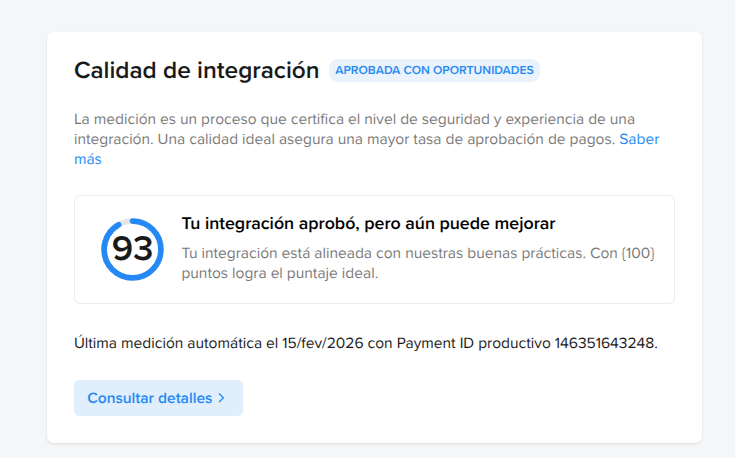
Mercado Pago’s quality checker scored this implementation at 93/100 (“approved with opportunities”), validating that the integration aligns with platform best practices.
Why AI + MCP Actually Helped
The speed gain was not “AI wrote everything.”
The gain came from:
- Fast navigation of official Mercado Pago docs
- Immediate cross-checking when errors appeared
- Reduced context-switching between code, logs, and docs
Without MCP + AI, I would still do the same architecture, but slower and with more trial-and-error.
The Architecture I Recommend (Short Version)
If you are integrating Mercado Pago for SaaS features, this is the setup I now recommend:
- Create preference on backend with SDK.
- Put deterministic
external_reference+ metadata. - Use idempotency key when creating preferences.
- Treat redirect as UX only.
- Process webhook as source of truth.
- Validate webhook signature.
- Re-fetch payment from Mercado Pago API before applying business state.
- Add minimal critical logs for: preference creation, webhook received, signature result, payment status, state transition applied.
This gives speed now and stability later.
What I’d Never Skip Again
- A real
ADMIN_APP_URL/public URL strategy for redirects - Explicit env vars for test vs production credentials
- Webhook observability (few logs, right places)
- A fallback manual confirm endpoint during rollout
Final Takeaway
Implementing payments fast is possible. Implementing payments safely is what matters.
In my case, “under one hour” happened because I combined:
- official SDK,
- webhook-first design,
- and AI with MCP pointed at official docs.
That combo gave me both velocity and confidence.
If you are building a SaaS and delaying payments because they feel “big,” start with this pattern and keep it strict. The complexity drops a lot when you avoid guessing and trust documented primitives.